
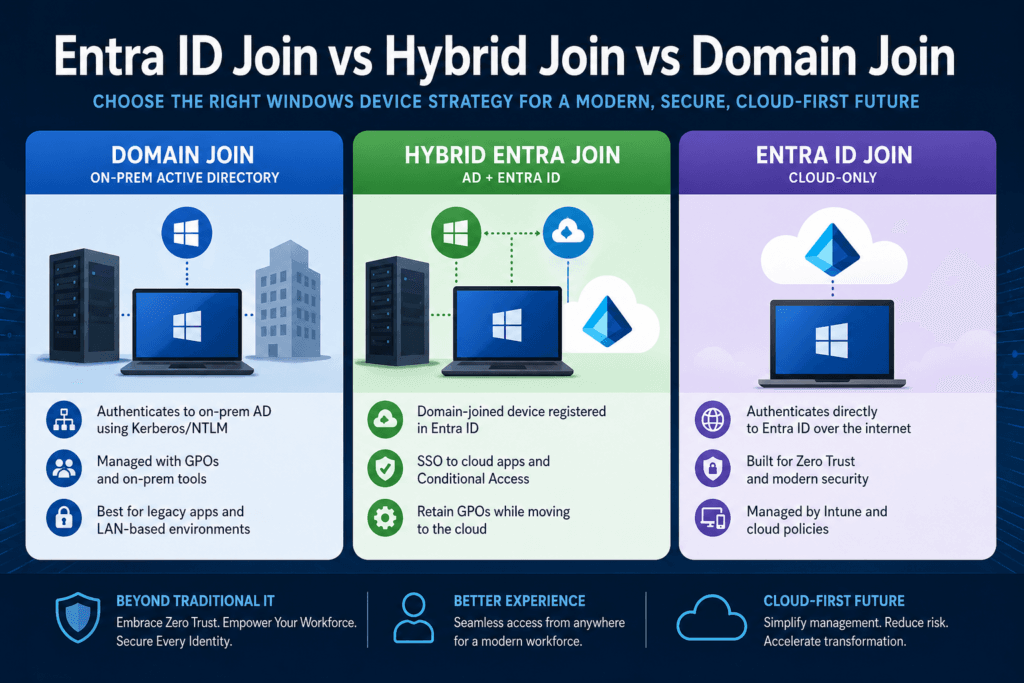
The way you join Windows devices is no longer a pure “IT plumbing” choice; it shapes your security posture, user experience, and how fast you can move off legacy infrastructure. Today, most enterprises are deciding between three models:
- Classic domain join (on-prem AD)
- Microsoft Entra hybrid join (AD + Entra)
- Microsoft Entra join (cloud only, no AD dependency)
This post breaks down what each model really means, when it fits, and why many organizations are now treating Microsoft Entra join as their end-state, with hybrid and domain join as transition tools rather than the destination.
Microsoft Entra join vs hybrid vs domain join – what are the differences?
Domain join (On-Prem Active Directory)
Active Directory domain-joined devices authenticate directly against on-premises AD domain controllers using Kerberos/NTLM over the corporate network. Group Policy Objects (GPOs) and on-prem tools (like ConfigMgr) apply configuration, software, and security baselines.
- What it’s good at: Rich, mature management of Windows servers and legacy desktops on LANs. Seamless access to classic SMB file shares and legacy line-of-business apps.
- Where it falls down: Remote work requires a VPN before sign-in. It clashes with cloud/SaaS identity models (Entra ID, OAuth/SAML), and relies on a network-centric security model where a compromised domain yields a massive blast radius.
Microsoft Entra hybrid join
Microsoft Entra hybrid join keeps the device domain-joined but also registers it in Entra ID to obtain a cloud Primary Refresh Token (PRT). The user signs into AD first, then Entra registration provides SSO to cloud services.
- What it’s good at: You retain domain-based access and GPOs while adding Entra benefits like SSO to Microsoft 365 and Conditional Access.
- Where it falls down: You now own and manage two worlds. Autopilot hybrid scenarios are fragile for remote devices, requiring line-of-sight to domain controllers. Crucially, you haven’t reduced your AD blast radius; you’ve just extended it to the cloud.
Microsoft Entra join (cloud-only device identity)
Microsoft Entra join removes dependency on on-prem AD completely.
In the Microsoft Entra join vs Microsoft Entra hybrid join vs domain join discussion, this is the most modern approach.
Best for:
- Remote-first companies
- Cloud-native environments
- Zero Trust security
Limitations:
- Requires modernization
- Not ideal for heavy legacy systems
Identity flow: who is the “source of truth”?
The biggest conceptual difference is where device and user identity “starts”.
- Domain join: User authenticates to AD; cloud is an afterthought bridged by sync.
- Microsoft Entra hybrid join: AD is still first; Entra is layered on top.
- Microsoft Entra join: Identity starts in Entra; AD is optional plumbing for legacy resources.
Microsoft’s cloud-first guidance increasingly assumes Entra ID as the source of authority. If your north star is AD minimization, Microsoft Entra join aligns directly with that goal. Hybrid is a step, not the finish line.
Security: Zero Trust vs network trust
Domain join: secure the network
Domain join assumes a trusted network boundary. Once on the LAN or VPN, you are “inside.” The problem? Attackers have proven that once they compromise AD, they can move laterally at scale.
Microsoft Entra hybrid join: better signals, same blast radius
Microsoft Entra hybrid join adds Conditional Access and Intune compliance, but the underlying trust anchor is still AD. A compromise of AD still cascades into your cloud environment.
Microsoft Entra join: identity-first Zero Trust
Microsoft Entra join aligns completely with Zero Trust: never trust, always verify. Devices are identity objects in Entra with per-device posture. Access is gated via Conditional Access (user risk, device compliance, location). For security-driven organizations, Microsoft Entra join plus AD minimization is the recommended strategic path.
User experience: LAN-bound vs internet-native
- Domain join UX: Excellent on the corporate LAN, but painful for remote work (VPN before logon, out-of-sync passwords).
- Microsoft Entra hybrid join UX: Better SSO to cloud apps, but device provisioning (Autopilot) often requires complex VPN plumbing or on-prem staging.
- Microsoft Entra join UX: Seamless. As long as users have internet connectivity, they can sign in and get SSO. No machine tunnels or DC line-of-sight required. It is the only model natively designed for a distributed workforce.
Management: GPOs vs Intune
- Domain join: Classic GPOs and ConfigMgr offer deep control but assume stable network connectivity.
- Microsoft Entra hybrid join: You get both GPOs and Intune. This is powerful but highly complex, forcing you to coordinate settings to avoid conflicts across parallel systems.
- Microsoft Entra join: Management is anchored entirely in Intune and cloud policies. This model extends naturally to macOS, iOS, and Android. For organizations serious about simplifying operations, Microsoft Entra join is where the operational model converges.
Practical decision matrix
| Scenario / Requirement | Best Fit Today |
| Mostly on-prem apps, heavy SMB shares, stable LAN | Domain join or Microsoft Entra hybrid join (short-term) |
| Transitional state: many legacy apps but growing SaaS | Microsoft Entra hybrid join (as an interim step) |
| Remote-first workforce, cloud-first app strategy | Microsoft Entra join |
| Aggressive AD minimization / AD retirement | Microsoft Entra join as target |
| Greenfield new business unit or M&A tenant | Microsoft Entra join + Intune by default |
A useful rule of thumb: Enable Microsoft Entra hybrid join for your existing fleet to bridge into the cloud, but default to Microsoft Entra join for all new devices.
Stop living in the hybrid transition state
Microsoft’s guidance and industry consensus are clear: treat Microsoft Entra join as the default for modern environments, use Microsoft Entra hybrid join as a temporary crutch, and relegate domain join to a legacy exception.
However, recognizing that Microsoft Entra join is the future is the easy part. Actually untangling decades of Group Policy, modernizing legacy application access, and migrating thousands of endpoints without disrupting your users is a massive, high-risk undertaking. You cannot afford to stay in the “hybrid trap” of managing two separate infrastructures forever, but you also cannot afford to break your business trying to leave it.
That’s where Opsole Migrate comes in.
Don’t let technical debt dictate your security posture. With Opsole Migrate, we provide the dedicated expertise, automated tooling, and proven frameworks required to accelerate your journey to a native Microsoft Entra joined environment. We handle the heavy lifting of GPO translation, application compatibility testing, and seamless user migration so your IT team can focus on the future, not the plumbing.
Ready to cut the cord on legacy AD? Contact the Opsole Migrate team today to schedule your infrastructure assessment and build your fast-track roadmap to true Zero Trust device management
Frequently asked questions
What is the difference between Microsoft Entra join vs Hybrid vs domain join?
The main difference between Microsoft Entra join vs Hybrid vs domain join is where device identity and management are controlled.
- Domain join relies completely on on-prem Active Directory and Group Policy.
- Microsoft Entra hybrid join keeps devices connected to both Active Directory and Microsoft Entra ID.
- Microsoft Entra join is cloud-native, where devices authenticate directly to Microsoft Entra ID and are managed through Intune.
Organizations moving toward Zero Trust and remote-first operations usually prefer Microsoft Entra join as the long-term strategy.
Is Microsoft Entra join better than Microsoft Entra hybrid join?
For most modern enterprises, yes. Microsoft Entra join supports cloud-first identity, remote work, Conditional Access, and Zero Trust security without depending on on-prem domain controllers.
Microsoft Entra hybrid join is often used as a temporary step for organizations still dependent on legacy applications and Group Policy.
When should you use Microsoft Entra hybrid join instead of Microsoft Entra join?
Microsoft Entra hybrid join is best when your organization still relies heavily on:
- legacy applications
- on-prem file shares
- Group Policy Objects (GPOs)
- domain-based authentication
It helps bridge the gap while preparing for a full move to Microsoft Entra join.
Can Microsoft Entra joined devices still access on-prem resources?
Yes. Even with Microsoft Entra join, devices can still access on-prem resources using modern solutions such as VPN, Azure App Proxy, SSO integrations, and cloud-managed authentication methods.
This makes it possible to reduce AD dependency without breaking business operations.
Can you move from Microsoft Entra hybrid join to Microsoft Entra join without wiping devices?
Yes. With the right migration strategy and tools like Opsole Migrate, organizations can move devices from Microsoft Entra hybrid join to Microsoft Entra join without wiping devices, losing user profiles, or disrupting end users.
This is especially important for large-scale enterprise migrations involving hundreds or thousands of endpoints.