If you’re planning to migrate hybrid joined devices to Entra ID across thousands of Windows endpoints, the real constraint isn’t technology, it’s the migration path Microsoft will support. For organizations managing 5,000+ hybrid-joined laptops, moving to Microsoft Entra Join with Intune requires a strategy that minimizes disruption while preserving user productivity.
The hard reality: what Microsoft actually supports
Microsoft’s cloud-native endpoint guidance is direct: existing devices joined to on-prem AD (including hybrid Microsoft Entra joined) must be reset to become Entra joined and if they can’t be reset, Microsoft states there’s no supported path to Entra join them.
Autopilot Reset is not the escape hatch. Microsoft’s Autopilot Reset documentation states it doesn’t support Microsoft Entra hybrid joined devices, and for hybrid devices a full wipe is required.
Microsoft’s own moderators have reiterated the same message in Q&A: there’s no Microsoft-supported process to convert hybrid-joined to Entra joined without a Windows reset.
Why “wipe” becomes a business problem at scale
A wipe-and-reprovision motion can be architecturally clean, but operationally expensive when multiplied by thousands of endpoints:
- Branch bandwidth and firewall saturation (OS updates + Microsoft 365 + line-of-business app estates)
- Local “unknown data” loss unless you have disciplined backup hygiene (local files, outlook setting, email signatures, app settings capture)
- A predictable support surge (reconfiguration, printers, profiles, app sign-ins, edge cases)
Yes, there are mitigations Delivery Optimization, pre-caching core apps, OneDrive Known Folder Move, standardizing profiles but they reduce pain; they don’t remove the disruption of a destructive rebuild.
Why Microsoft defaults to reset
This isn’t negligence, it’s risk management. Reset/wipe gives Microsoft a deterministic route to a known-good cloud-native state and avoids edge cases introduced by hybrid join complexity and legacy profile permissioning.
And hybrid join itself carries structural constraints: devices require periodic line-of-sight to domain controllers; when that’s not viable, cloud join is the cleaner operational model.
Planning to move from Hybrid Join to Entra ID Join?
Book a Free Entra ID Device Migration Assessment
Understanding Hybrid Join is only the first step. The real challenge starts when existing Windows devices need to be moved to Entra ID without wipe, reimage, or user profile loss.
The two lanes to Entra Join
Lane A: Microsoft-native, wipe-based migration (supported path)
This is Autopilot (or equivalent) with reset/wipe and re-provision into Entra join + Intune.
It can be the right answer when you:
- Are already planning a device refresh
- Need a clean rebuild for security reasons
- Have strong data portability controls already in place
Lane B: In-place conversion with specialist tooling (Microsoft-supported end state, third-party process)
This is the reality: enterprises often need continuity (profiles, settings, minimal downtime) while still reaching a cloud-native architecture. Microsoft supports the end state (Entra joined, Intune managed) but does not productize a native “convert-in-place” button for hybrid-to-Entra join.
This is where specialist tools exist. Quest, for example, explicitly positions device migration capabilities for converting domain-joined or hybrid devices to Entra joined scenarios.
What an in-place approach must do
To be credible for enterprise operations and audit, an in-place approach needs to be policy-driven and evidence-ready, not “script roulette.” Mechanically, the process usually has to orchestrate four things:
Pre-migration validation
- Identity readiness (Entra device policies, CA enrolment exclusions where needed, enrolment restrictions)
- Intune readiness (profiles, apps, compliance baselines, Autopilot strategy even if not wiping)
- Encryption and recovery (BitLocker posture, recovery key capture)
- Line-of-business dependencies (mapped drives, cert-based auth, legacy VPN, hard-coded paths)
Disjoin the legacy state
- Remove on-prem AD domain join / hybrid posture safely and predictably (Even there is no line-of-sight to the AD Domain)
Join to Microsoft Entra
- Execute a native Entra join and ensure Intune enrollment flows correctly
Profile continuity
- Remap access to the existing user profile (ACL/SID permission remediation) so the user keeps their environment without a rebuild
Opsole Migrate is one example (which we tested) of a purpose-built migration engine focused on this gap automating hybrid / domain-to-Entra join conversion while prioritising profile continuity, centralized monitoring, and audit logging (so the process is operable at scale, not a one-off hero script).
It is an agentless, self-service solution that requires no direct IT involvement during execution. End users can initiate and complete the migration independently, without remote assistance or hands-on support from the IT team
The hidden bill: why “free” wipe-based migration rarely stays free
A defensible way to discuss cost is with a simple model and explicit assumptions:
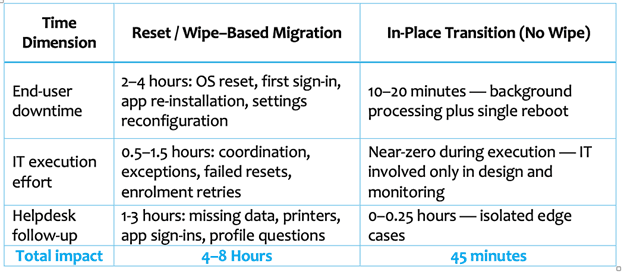
Comparison table on Productivity outage on different migration model
Cost = device_count × hours_lost_per_device × blended_rate
Example:
- 5,000 devices
- 6 hours lost per device (IT effort + user downtime + post-migration support) . Total 30,000 hours of employee productivity outage
- $60 blended rate
5,000 × 6 × $60 = $1,800,000
Sensitivity (more honest, harder to dispute):
5,000 × (4–8 hours) × ($40–$100) ⇒ $800k–$4.0M
But the financial cost is just the tip of the iceberg. The deeper wound is the Productivity Black Hole.
- 30,000 Hours Lost: That is equivalent to shutting down your entire company for nearly four days.
- Employee Experience (EX): Nothing kills morale faster than forcing an employee to stare at a “Setting up your device…” screen when they have deadlines.
At a glance: methodology showdown
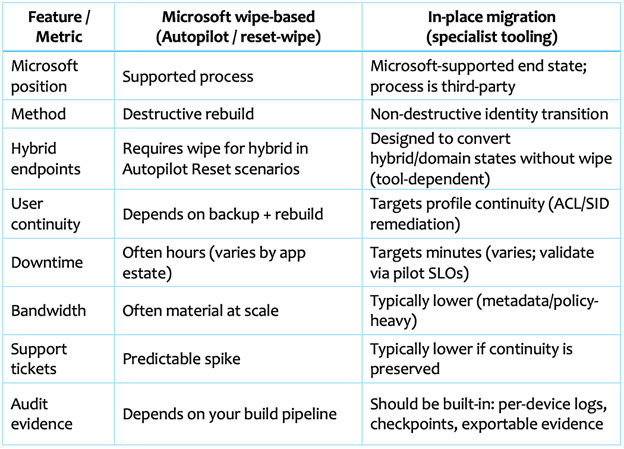
Feature / Metric
In-place approaches tend to fit best when you need:
- Minimal end-user disruption (executive devices, traders, frontline ops)
- Large-scale migrations where rebuild capacity is the bottleneck
- Preservation of local profiles and “unknown but important” user state
They’re often not the first choice when:
- Devices are already due for refresh, or security posture demands a rebuild
- You have deep domain dependencies that must be re-architected first (legacy machine auth, brittle GPO-only configurations, domain-tied LOB apps)
- You can’t standardize prerequisites (enrollment readiness, encryption posture, app packaging discipline)
A practical next step: prove it with a controlled pilot
Run a 25–50 device pilot across rings (IT → power users → standard users) with explicit success criteria: Contact for free PoC to Opsole Migrate.
- Median migration time target: ≤ 15 -30 minutes (per device)
- Failure + rollback target: ≤ 2%
- Ticket rate target (first 72 hours): ≤ 0.2 tickets/device
- Evidence: per-device audit trail (who/what/when), exported to your logging platform
Conclusion
The myth is that cloud migration must be a scorched-earth rebuild to be “correct.” Microsoft’s supported process for existing hybrid/domain devices leans heavily toward reset/wipe, and Autopilot Reset explicitly doesn’t support hybrid without a full wipe.
The reality is you can separate target architecture from migration mechanics: reach the Microsoft-supported end state (Entra join + Intune) while choosing an operable migration approach that protects continuity where the business requires it.
Planning to move from Hybrid Join to Entra ID Join?
Book a Free Entra ID Device Migration Assessment
Understanding Hybrid Join is only the first step. The real challenge starts when existing Windows devices need to be moved to Entra ID without wipe, reimage, or user profile loss.